Small accounting firms do not need to wait for a formal AI strategy to have an AI risk problem. In 2026, staff may already be using ChatGPT, Claude, Copilot, QuickBooks AI or other tools to draft emails, explain Excel formulas, summarize PDFs, research questions and speed up routine work.
The issue is not whether AI can help. It can. The issue is whether client-identifying data, taxpayer records, payroll details, bank information, financial statements, contracts or workpapers are being pasted into tools the firm has not approved.
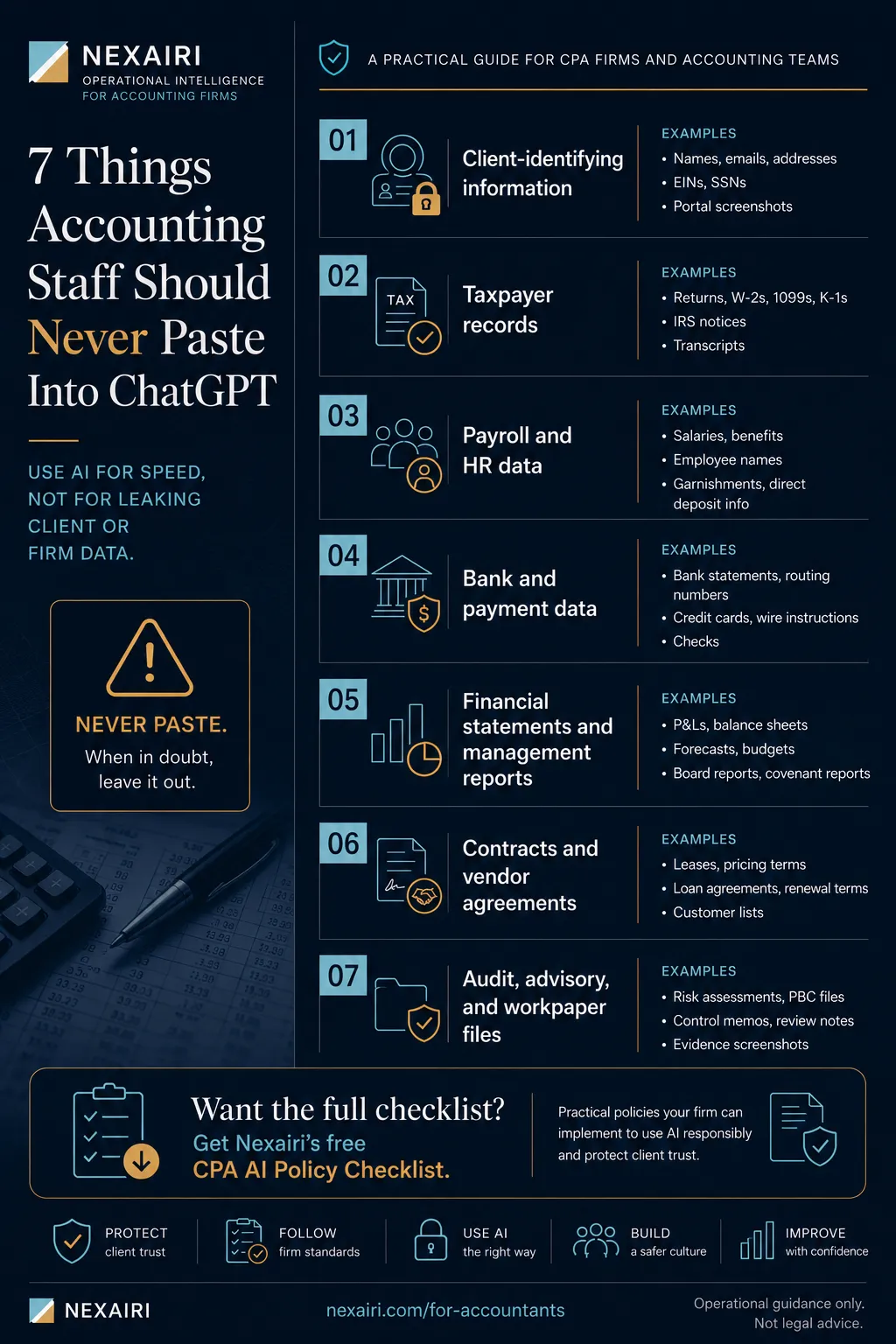
Clear answer: accounting staff should never paste client-identifying information, taxpayer records, payroll and HR data, bank or payment data, full financial statements, contracts or audit/advisory workpapers into public or unapproved AI tools. This article works with Nexairi's broader guide to AI operational standards for accounting firms.
Start With the Free Checklist
Before staff use AI in client-adjacent work, run the free CPA AI Policy Checklist. It helps define approved tools, prohibited data, redaction rules, review standards and incident response.
Start the free CPA AI Policy Checklist. If you need editable policy language this week, see the CPA AI Policy Kit.
What Is the Short Rule for Accounting Staff Using AI?
Think of an AI prompt like an email to an outside software vendor. If staff would not send the information to a vendor the firm has not reviewed, they should not paste it into an unapproved AI tool.
That rule is intentionally simple. Staff need a boundary they can remember in the middle of actual work, not a policy document they only read once.
What Client-Identifying Information Should Staff Never Paste?
Never paste client names, entity names, addresses, emails, phone numbers, EINs, SSNs, client IDs, portal screenshots or engagement letters with identifying details.
Bad prompt: "Summarize this email from Acme Manufacturing about its payroll tax issue."
Safer prompt: "Summarize this anonymized client email about a payroll tax notice. Remove all names, IDs and amounts before review."
Even without a name, context can identify a client. A specific transaction, business location, unusual fact pattern or industry detail may be enough. When in doubt, redact or do not paste.
Can Staff Paste Taxpayer Records or Tax Return Data Into AI?
Never paste tax returns, W-2s, 1099s, K-1s, tax notices, IRS transcripts, dependent information, filing status details tied to a real person, taxpayer addresses, taxpayer IDs or unredacted client tax questions.
IRS Publication 4557 tells tax professionals to safeguard taxpayer data and maintain written security practices. AI can help explain generic tax concepts, but staff should not paste real taxpayer data into unapproved tools.
Can Payroll, HR and Employee Data Go Into AI Tools?
Never paste payroll registers, salary data, employee names, benefits information, garnishments, direct deposit details, performance notes, termination details, medical information or leave information.
Bad prompt: "Turn Northside Dental's payroll register into a summary by department."
Safer prompt: "Create a generic payroll-summary template using dummy departments and placeholder amounts."
Payroll data often combines financial, personal and employment-sensitive information. A single payroll register can expose an entire organization if mishandled.
Can Staff Paste Bank, Credit Card or Payment Data Into AI?
Never paste bank statements, routing numbers, account numbers, credit card statements, payment processor exports, wire instructions, vendor payment details, check images or bank-feed screenshots.
This matters even when AI looks useful for bank categorization or cleanup. Staff should not upload raw bank data to tools the firm has not approved and reviewed.
Can Staff Paste Financial Statements or Management Reports Into AI?
Never paste full P&Ls, balance sheets, cash-flow statements, budget-versus-actual reports, forecasts, board reports, investor updates or covenant reports.
Bad prompt: "Explain why Lakeside Retail's March gross margin fell using this full P&L."
Safer prompt: "Draft a generic variance-analysis checklist for a retail business using placeholder numbers."
AI can help draft a generic variance explanation template. Real client numbers and business context need approval and redaction first.
Can Staff Paste Contracts, Leases or Vendor Agreements Into AI?
Never paste client contracts, lease agreements, loan agreements, vendor contracts, pricing terms, renewal terms, confidentiality clauses or customer lists.
AI can summarize generic contract concepts, but uploading private agreements can create confidentiality and client-trust risk. Many agreements restrict disclosure to third parties, including software vendors.
Can Staff Paste Audit, Advisory or Workpaper Files Into AI?
Never paste audit workpapers, sampling files, risk assessments, internal control memos, client PBC files, management letters, representation letters, evidence screenshots or review notes with client details.
AI output still needs human review. AI can miss context, invent details or create unsupported conclusions. A workpaper modified by AI without review creates accuracy and documentation risk.
How Should Firms Use a Red-Yellow-Green Rule for AI?
| Category | Red: Never Paste Into Unapproved AI | Yellow: Redact and Review First | Green: Usually Lower Risk |
|---|---|---|---|
| Client data | Names, EINs, SSNs, portal screenshots, client emails | Anonymized scenarios with identifying details removed | Generic examples not tied to a real client |
| Tax and payroll | Returns, notices, payroll registers, salary data | Generic tax or payroll questions after redaction | Public guidance, generic explanations, dummy examples |
| Financial records | Full statements, bank files, forecasts, board reports | De-identified variance examples or template language | Public-company examples or non-client training data |
| Contracts and workpapers | Private agreements, audit evidence, PBC files, review notes | Redacted clauses or generic workflow questions | Public regulations, standards and non-confidential checklists |
What Can Accounting Staff Use AI For More Safely?
AI can still be useful when the firm sets boundaries. Lower-risk uses include generic email templates, Excel formula help, public-guidance summaries, checklist drafts, anonymized workflow examples, training text, meeting agenda templates and dummy-data spreadsheet help.
The rule is not "never use AI." The rule is "use AI for drafting and thinking, not for unapproved handling of real client or firm data." For the commercial follow-through, route staff and partners to Nexairi's accounting AI resource page rather than a generic homepage.
Why Accounting Firms Need a Tighter Standard
Accounting firms are not just protecting their own files. They hold client records, taxpayer data, payroll information, bank details and advisory documents for many businesses. That makes vague AI guidance risky. IRS Publication 4557, the FTC Safeguards Rule and the NIST AI Risk Management Framework all point toward written safeguards, defined controls and ongoing review.
What Minimum AI Policy Does Every Accounting Firm Need?
A practical AI policy should cover these ten controls:
- Approved tools list
- Prohibited data list
- Redaction rules
- Client-data and taxpayer-information boundaries
- Human-review requirement
- Vendor review checklist
- Staff acknowledgment
- Client disclosure language
- Incident response workflow
- Quarterly review cadence
Answer those questions, write them down and train staff against examples. That is the 2026 baseline. Build from there if your firm needs more.
What Should a Firm Do If Staff Already Used AI With Client Data?
If sensitive information already went into an unapproved AI tool, do not delete evidence or improvise. Use a simple preservation workflow:
- Stop further use of the tool, prompt or output for that client matter.
- Preserve the prompt, output, tool name, user, date and data involved.
- Notify the policy owner or firm leadership.
- Review vendor terms, account settings and data retention language.
- Decide whether counsel, insurers, compliance advisors or affected clients need to be involved.
- Update the staff rule or training gap that allowed the mistake.
This is not legal advice. It is an operational workflow so the firm is not making decisions from memory under pressure.
Turn the Boundary Into Written Rules
This article gives staff the boundary. The next step is documentation: approved tools, prohibited data, redaction rules, staff acknowledgment, vendor review, client disclosure language and incident response.
Get the free CPA AI Policy Checklist or use the CPA AI Policy Kit if you need editable documents this week.
What Questions Will Staff Ask About AI Rules?
Can staff use ChatGPT for Excel formulas?
Yes, if the prompt does not include client-identifying data, private financial data or sensitive workpapers. Use dummy data where possible.
Can staff use AI to draft client emails?
Yes, but avoid pasting real client details into unapproved tools. Draft from a generic scenario, then customize inside approved firm systems.
Is Microsoft Copilot automatically safe?
No. Tool choice, account type, settings, data retention, permissions and firm approval all matter. Firms still need written rules.
Is QuickBooks AI enough governance?
No. Vendor AI features do not replace firm policy, staff training, data boundaries or review standards.
Can we just ban AI?
You can, but bans are hard to enforce if staff see AI as useful. A practical policy usually works better than an unrealistic ban.
Is this legal advice?
No. This is operational guidance. Firms should have counsel, insurers or compliance advisors review final policy language for their specific situation.
Sources
Related Resources on Nexairi
Free Assessment
Is your firm ready for AI?
A 5-minute governance check for CPA firms using ChatGPT, Copilot or AI accounting software. Get your score and your top gaps — free.
Jim Smart is the founder and editor in chief of Nexairi. A Business Intelligence Developer with experience building data systems for Verizon, U.S. Army operations, and enterprise finance teams, Jim spent years turning complex data into decisions that executives could act on — dashboards, forecasting models, and automation pipelines across telecom and government contracting. He founded Nexairi to apply that same clarity to AI: making emerging technology understandable and actionable for the operators, accountants, and business owners who need it most. Jim holds GenAI certifications from the University of South Florida Bellini College of AI and completed Springboard's Data Science Career Track.